Monday, August 29, 2011
I Eat Pasta: Farfalle
I Eat Pasta: Farfalle: I am taking a break from the flavored pasta today (don't worry, there's more to come). The post today is about home made farfalle. It is a p...

Saturday, August 20, 2011
Book Review: The Lost Symbol
 The Lost Symbol by Dan Brown
My rating: 4 of 5 stars
Well, is this a award winning book? No, but I have to say it was really fun and captivating. Once I started reading, I wanted to keep going and find out what was next. The story evolved really well and I have to say that I enjoyed it.
I kept picturing Tom Hanks as Robert Langdon, so maybe that's coming in the near future. The way Dan Brown took the story and tied with Mason elements was really nice. If you are looking for fun and enjoyable read, this one is for you.
View all my reviews
Sunday, August 14, 2011
I Eat Pasta: Basil Fettucine
I Eat Pasta: Basil Fettucine: "Following up on the series of flavored recipes, today we tested basil fettuccine. The preparation is the same as Spinach Pasta , except we ..."
Friday, August 12, 2011
Google Chrome Blog: Building better web apps with a new Chrome Beta
Google Chrome Blog: Building better web apps with a new Chrome Beta: "Today’s new Beta channel release brings big improvements to Chrome’s web platform capabilities, enabling developers to build more powerful ..."
I wonder if this will really be secure to use. It is certainly an entertaining idea.
Thursday, August 11, 2011
Official Google Blog: Restoring Bletchley Park, birthplace of modern com...
Official Google Blog: Restoring Bletchley Park, birthplace of modern com...: "Late last year Google backed the bid to buy the papers of the British computer scientist and wartime codebreaker Alan Turing and return t..."
Monday, August 08, 2011
Book Review: The Diamond Age: Or, a Young Lady's Illustrated Primer
 The Diamond Age: Or, a Young Lady's Illustrated Primer by Neal Stephenson
My rating: 3 of 5 stars
I finally finished this book and I have to say that there are some really good parts to the story. The idea about using nanotechnology is really great and some of the descriptions of the primer and Turing machines is really nice.
But, like some other reviewers said, there are lots of pages in the book that feel unnecessary. I liked some of the characters but it was a dense book to read and I would have rated it much better if it had 1/3 fewer pages.
View all my reviews
Sunday, August 07, 2011
I Eat Pasta: Beet Pasta
I Eat Pasta: Beet Pasta: "Following up on the Spinach Pasta recipe, today I will explore using beets to flavor and color the pasta. The preparation is the same, exc..."
Tuesday, August 02, 2011
Book Review: The Girl Who Played with Fire
 The Girl Who Played with Fire by Stieg Larsson
My rating: 5 of 5 stars
Excellent continuation from The Girl with the Dragon Tattoo. I've got a digital copy of this book while on vacation and I read it almost non stop on my iPhone screen. The story was well written and the reading was just enjoyable. I can't wait until I read the final book of the series.
View all my reviews
Monday, June 22, 2009
Replacing the color wheel on my Samsung HL-R4266W DLP
Our Samsung DLP HL-R4266W started making some noises which made it unbearable. The noise would come and go at random times. I found that pushing the back of the TV would make it go and used a temporary workaround for a while until it came back with a vengeance!
So, I searched on some forums and on Google and I ran across several posts on how to do it yourself. I also called a technician and found that it would cost me about US$ 400,00 to replace it via him.
So, after finding a few posts and videos about it, I decided to do it myself (links at the end of the post). I found the right part number for my TV from the Samsung website, found a cheap one on EBay and bought it.
I am posting below some pictures of my process, although not complete.
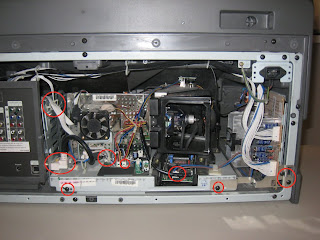
1. First step is to remove the cover of the TV to expose the back. I marked the cables and screws I had to disconnect with a red circle:
2. Take out the display lamp by removing the screw and pulling it out:
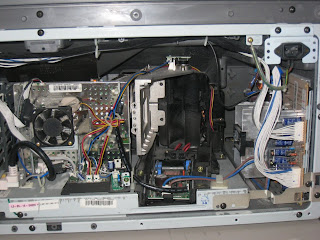
3. Pull the optics module out slowly and watch for the cables on top and on the left side. Remove the big fan on the right side. Next, disconnect the cable on top of the lamp housing:
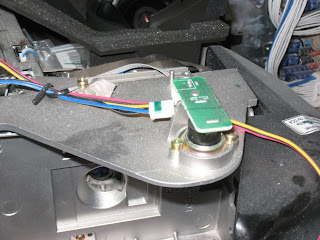
Remove the lamp housing by removing the three screws and slowly remove it:
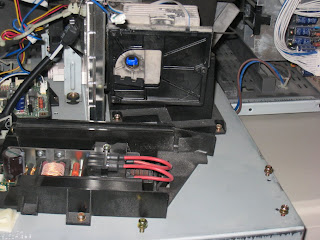
4. Disconnect the two cables from the color wheel:
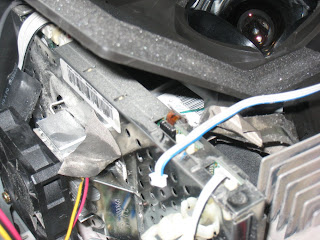
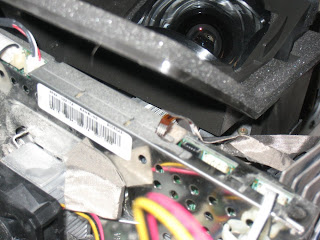
5. Remove the two screws holding the color wheel in place and pull it out. Here's my old color wheel:
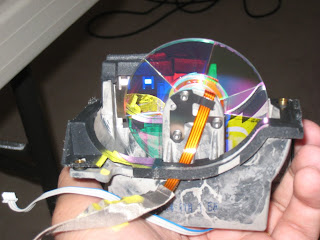
Here's the new color wheel:
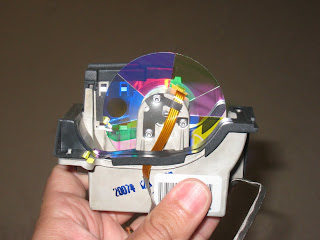
Not much difference between them, but spinning the old color wheel resulted in some small noise.
6. Do the steps above in reverse order. Hopefully you didn't miss any steps and your TV is back working like a charm.
After the fix, my TV is much quieter than what it was before.
Here's the link to the other posts that helped be get this done:
I recommend you do this slowly, taking notes and pictures, so you have a reference in case things don't go to plan or your TV is different. Good luck if you decide to try.
So, I searched on some forums and on Google and I ran across several posts on how to do it yourself. I also called a technician and found that it would cost me about US$ 400,00 to replace it via him.
So, after finding a few posts and videos about it, I decided to do it myself (links at the end of the post). I found the right part number for my TV from the Samsung website, found a cheap one on EBay and bought it.
I am posting below some pictures of my process, although not complete.
1. First step is to remove the cover of the TV to expose the back. I marked the cables and screws I had to disconnect with a red circle:

2. Take out the display lamp by removing the screw and pulling it out:

3. Pull the optics module out slowly and watch for the cables on top and on the left side. Remove the big fan on the right side. Next, disconnect the cable on top of the lamp housing:

Remove the lamp housing by removing the three screws and slowly remove it:

4. Disconnect the two cables from the color wheel:


5. Remove the two screws holding the color wheel in place and pull it out. Here's my old color wheel:

Here's the new color wheel:

Not much difference between them, but spinning the old color wheel resulted in some small noise.
6. Do the steps above in reverse order. Hopefully you didn't miss any steps and your TV is back working like a charm.
After the fix, my TV is much quieter than what it was before.
Here's the link to the other posts that helped be get this done:
- The closest to my TV model: http://kploymp.net/dlp_cw.aspx
- Great tutorial, slightly different in some places from my TV: http://www.jangro.com/electronics/samsung-dlp-replace-color-wheel/
- Lots of pictures: http://guides.fixyourdlp.com/samsung/bp96-01579a.php
- YouTube video: http://www.youtube.com/watch?v=Cx4pbNjsxfU
I recommend you do this slowly, taking notes and pictures, so you have a reference in case things don't go to plan or your TV is different. Good luck if you decide to try.
Saturday, October 13, 2007
Web site updated
Just to inform that I updated the main page of http://winplanner.sf.net to point to the latest download available, so people don't download version 0.14.1 anymore.
I will try to update Planner again soon. Work has been taking my time.
Francisco
I will try to update Planner again soon. Work has been taking my time.
Francisco
Saturday, December 16, 2006
Version 0.14.2 released
Hello!
I finally had time to compile Planner 0.14.2 and make it available.
New features and fixes
======================
* fix bug #353232 - patch to raise majic priority, fixing nautilus behavior when clicking on a planner file
* fix bug #368186 - patch to paint guide lines behind project start date rather than on top - contributed by Arthur Petitpierre
* added -Wno-return-type for compile with database enabled
* patch related to bug #353213 - added #ifdefs to allow compile with libgda 1 or 2, up to libgda-1.9.102
* Added Arabic - contributed by Djihed Afifi
* fix for bug 358415 crash in gantt view, contributed by Arthur Petitpierre and mdpoole trolius org.
I've also fixed the installer bug which failed to recognize GTK 2.10 as a valid for Planner usage.
You can download it from here: http://prdownloads.sourceforge.net/winplanner/planner-0.14.2.exe?download
Francisco
I finally had time to compile Planner 0.14.2 and make it available.
New features and fixes
======================
* fix bug #353232 - patch to raise majic priority, fixing nautilus behavior when clicking on a planner file
* fix bug #368186 - patch to paint guide lines behind project start date rather than on top - contributed by Arthur Petitpierre
* added -Wno-return-type for compile with database enabled
* patch related to bug #353213 - added #ifdefs to allow compile with libgda 1 or 2, up to libgda-1.9.102
* Added Arabic - contributed by Djihed Afifi
* fix for bug 358415 crash in gantt view, contributed by Arthur Petitpierre and mdpoole trolius org.
I've also fixed the installer bug which failed to recognize GTK 2.10 as a valid for Planner usage.
You can download it from here: http://prdownloads.sourceforge.net/winplanner/planner-0.14.2.exe?download
Francisco
Monday, September 25, 2006
Version 0.14.1 released
The new version of WinPlanner is now available, mirroring the release of Planner 0.14.1. This fixes the Gantt crashes reported.
ChangeLog:
* new man page contributed by Martin-Eric Racine
* fix for bug #353213 - fix compile with libgda 1.3.91 - contrubuted by Dennis Lubert
* corrected build of translated user guides
* src/planner-format.c: fix NULL pointer deref - bug #334121
* src/planner-gantt-row.c: patch to fix segv on scrolling - bug #345517
* po/POTFILES.in: Added missing files per bug #344793
* README: Put some better, more current info in there
* NEWS: Updates since v0.13
You can download it here: http://prdownloads.sourceforge.net/winplanner/planner-0.14.1.exe?download
ChangeLog:
* new man page contributed by Martin-Eric Racine
* fix for bug #353213 - fix compile with libgda 1.3.91 - contrubuted by Dennis Lubert
* corrected build of translated user guides
* src/planner-format.c: fix NULL pointer deref - bug #334121
* src/planner-gantt-row.c: patch to fix segv on scrolling - bug #345517
* po/POTFILES.in: Added missing files per bug #344793
* README: Put some better, more current info in there
* NEWS: Updates since v0.13
You can download it here: http://prdownloads.sourceforge.net/winplanner/planner-0.14.1.exe?download
Wednesday, September 13, 2006
Gantt crash
Well, it seems like the latest version of the Planner code in CVS no longer suffers from the crash. I will check the reported the issues again and see if this is fully fixed.
It seems version 0.14.1 will be released soon, so I will make that available once the official release is done.
It seems version 0.14.1 will be released soon, so I will make that available once the official release is done.
Monday, September 11, 2006
Status
What's going on? Well, I haven't had much time to work on WinPlanner, but I started porting it from libgnomeprint to new printing support in GTK 2.10. So far, it seems to work so far, but Windows still doesn't have a version, so I cannot tell you how well it works there. Tor Lillqvist (tml) says a version is coming soon.
As for people reporting the Gantt crashes, I've recreated them and it seems like I need to recompile the libgnomecanvas with a later version of the code. I will try to do that this week and see if it fixes the problem. If so, I will release a fixed version.
Francisco
As for people reporting the Gantt crashes, I've recreated them and it seems like I need to recompile the libgnomecanvas with a later version of the code. I will try to do that this week and see if it fixes the problem. If so, I will release a fixed version.
Francisco
Saturday, June 17, 2006
WinPlanner 0.14 released
You can now download version 0.14 of WinPlanner on the sourceforge page: http://winplanner.sourceforge.net/ or http://sourceforge.net/projects/winplanner/
Please report any problems not related to native printing.
Francisco
Please report any problems not related to native printing.
Francisco
Sunday, April 09, 2006
Working on Gantt alignment bug
I have been helping in fixing the Gantt alignment bug that causes the Gantt chart and the task tree to be disaliagned. I think we now have a solution that will work for everybody.
I will try to post more often as time permits of course.
Francisco
I will try to post more often as time permits of course.
Francisco
Thursday, February 16, 2006
Windows native printing
I'd like to hear everyone's experience with native printing on Windows.
If you get funny characters printed, then your printer is doing font substitution. You need to change the print defaults... in the printer settings and find the font substitution settings to disable it.
Please post comments on your experiences. I may take a look to see if this can be fixed.
Francisco
If you get funny characters printed, then your printer is doing font substitution. You need to change the print defaults... in the printer settings and find the font substitution settings to disable it.
Please post comments on your experiences. I may take a look to see if this can be fixed.
Francisco
Monday, February 13, 2006
New version
Just released a new version. You can download it from: http://sourceforge.net/project/showfiles.php?group_id=135505&package_id=148812&release_id=393294
It solves the problem of HTML exporting and contains all current code from CVS as of today.
Sorry for the delay (been too busy with work).
Francisco
It solves the problem of HTML exporting and contains all current code from CVS as of today.
Sorry for the delay (been too busy with work).
Francisco
Friday, April 22, 2005
What's going on?
Well, I have been submitting patches for the Windows compilation. We are almost there. Jani Tiainen has also submited a patch to allow the application to run from any directory, so that will help as well.
Aside from that, I have also:
Aside from that, I have also:
- MS Project 98 MPP import: working on a plugin to import MS Project 98 files. Working but needs a little more work
- SQL support: Jani and I have have been experimenting with the SQL support available on the Linux distros. It mostly works but there are some issues like resave problems and only PostgreSQL.
Wednesday, April 06, 2005
New version released
Just released a new version. You can download it from:
https://sourceforge.net/project/showfiles.php?group_id=135505&package_id=148812&release_id=318410
It fixes some problems found on non English systems where Planner would lock up.
Francisco
https://sourceforge.net/project/showfiles.php?group_id=135505&package_id=148812&release_id=318410
It fixes some problems found on non English systems where Planner would lock up.
Francisco
Subscribe to:
Posts (Atom)